
When running queries, reviewing execution plans, or diving into Query Store it’s not uncommon to see missing index recommendations, particularly for more complex queries. But are they any good?
There are many factors when considering an index. However if you’re a situation where these missing index recommendations are enticing, I wanted to cover 3 key areas you want to consider and specifically what action to take before hitting Execute.
Let’s work from an example against the StackOverflow database. Find the details of votes where a specific user has favourited posts over a specific time window:
SELECT *
FROM dbo.Votes
WHERE CreationDate BETWEEN @StartDate AND @EndDate
	AND VoteTypeId = 5		/* Favourite */
	AND UserId = @UserId;
…and here’s the recommendation provided:
CREATE NONCLUSTERED INDEX [<Name of Missing Index, sysname,>]
ON [dbo].[Votes] ([UserId],[VoteTypeId],[CreationDate])
INCLUDE ([PostId],[BountyAmount])
So, what would be important to consider before implementing this index?
Table sizing
The first warning flag we need to consider is the table sizing. It’s not just the size but the growth rate too. How many records are in the table? How many records are added or changed through each day?
The larger the table, the more careful we likely want to be when adding new indexes. They’re typically large as they grow at a faster rate, for example transactional data. This can provide different challenges:
- A large number of records impacts index creation as it’ll take longer to work through the volume. If you don’t have access to
ONLINEindex creation, this would lead to extensive blocking - A high growth rate will impact DML operations after the index is created. This will slow down changes due to needing to update the index as they’re made.
We need to remember that ‘large’ is a relative term. Relative to your environment and other tables in the same database or server. You’ll know what large is for your own situation. In this example, the dbo.Votes table contains over 150mil records, nearly half the records in the whole database.
Large tables can be a challenge to manage. A recommended index may not be the best choice. There could also be other considerations such as table partitioning at play. For your ‘large’ it would be best to take the time to understand the recommendation, usage patterns, and existing indexes, before determining the best approach.
💡 Action: Review the size of your table and growth rate and how it compares across the database and rest of the instance. If this table is an outlier or there are concerns about impact during creation or regular usage, take the time to review, test, and refine the recommendation
Column order
Column order of indexes is important as it can make its usage more efficient. It can also lead to indexes being more attractive for other queries to use too. The recommendation focuses on being efficient rather than optimal. It’s based on 3 sections:
- Equality columns are first as we’re looking for exact values so can be used to seek directly where needed
- Inequality column will be used as keys but after the equality columns. These typically need a scan rather than seek and include ranges such as
BETWEEN(in our example),<,>, orINoperations - Include columns are also returned but not used in searching the records. This will include all other columns in the table if the query is a
SELECT *(we’ll come back to this)
These groupings can be seen if you check out the Properties for the execution plan:

The ordering of the groups is generally best practice. However the order of columns inside the group may not be optimal. The column order provided by the recommendation is based on the order they appear within the table. For example both UserId and VoteTypeId are equality filters, however the recommendation provides them in that order due to the table schema:
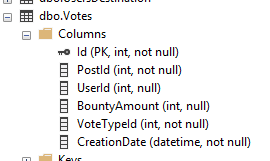
For our query this wouldn’t make a difference. If we know other queries typically search based on the VoteTypeId for a particular reason, we may choose to switch those. The same would also be true for the order of the inequality columns within that group.
We’ll specifically look more at the included columns below.
💡 Action: Review the index recommendation groups and determine the appropriate order for columns in the index based on expected usage patterns. The equality, inequality, and include groups of columns should typically stay in that order.
Included columns
When recommending an index, the optimiser will suggest a covering index for the query. That is to say it will cover all columns required from that particular table to avoid needing to read the underlying table as well as the index.
The way that this is achieved is through the usage of included columns. By adding other fields from the table as included columns, the query won’t have to go back to the underlying table to get the remaining fields.
That’s great for performance, but if you need a lot of additional fields, that can be expensive. It’s extra storage for the index, impact INSERT, UPDATE, and DELETE operations on the table, plus consume more memory due to its size.
Generally you have two options:
- Keep the included columns to have a covering index and improve performance of the query, potentially at the expense of other operations on the same table
- Remove the included columns altogether. There’s little reason to have some, as the difference in looking up 1 column, or 5, or 10, will be minimal
💡 Action: consider the additional columns which are included – how many there are, what data types they use, and how often they may change. If any of these feel ‘large’ then try without the included columns
Wrap up
Missing index recommendations are handy pointers. I’m really not against them, unless they’re used blindly. In this post we’ve looked at a few key things to focus on when considering the recommendations.
Sure, if you dig to deep there are a lot of shortcomings with them, but used carefully they can still provide benefit which could be refined at a later stage.
The actions we looked at for each:
- Table sizing: is it a large table and likely to impact performance during the creation or regular DML operations? If so, reconsider the index or take more time to review and refine the design
- Column order: columns will likely be grouped correctly for equality vs inequality clauses, but you should check the order inside of these groups
- Included columns: is the performance gain worth the impact the DML operations, or is the list of included columns relatively small? If not, try getting rid of them
The index recommendation provided is a covering index. Whilst these can be very useful in the right conditions – even for very small queries – you typically want to be selective with where they’re used. A lot of indexes with a long list of INCLUDE columns on one table can quickly degrade performance.
This post isn’t designed to be exhaustive. Its to highlight what I’d consider to be the 3 key areas to focus on if you’re considering the missing index recommendation.
As a bonus, if you stumble upon indexes named [<Name of Missing Index, sysname,>] in your database, you can be pretty confident these were created blindly and are worth a review.
 Andy Brownsword
2 replies on “Using Missing Index Recommendations in a Pinch”
[…] Andy Brownsword reviews the list: […]
[…] Review missing index recommendations to consider […]