
Last week we looked at using a cache to improve lookup performance. We saw how a cache improves performance by being able to reuse reference data repeatedly. That used a regular cache but it’s not the only option available to us.
In this post we’re going to look at the File Cache option which can achieve the same results – plus a little more.
Why use a File Cache?
Unlike a regular cache which only retains the details in memory whilst executing, a File Cache will deposit the data to disk, and the file will persist after execution. The file is still read into memory to be used so provides the same performance benefits we showed for a regular cache too.
By using a file as an intermediary this can help isolate your data source from an ETL process. There are two particular use cases where this can be a great benefit:
- Cross-environment communication is restricted, such as highly sensitive data which should not be accessible
- Data is very static and reused heavily across multiple processes so can be refreshed infrequently, such as a calendar
In both of these cases we either don’t have or don’t want to be accessing live records.
By using a file based caching approach, we can populate the cache and then reuse the file wherever needed, including a different environment.
Using a File Cache
Using a File Cache is much the same as using a regular one. The difference comes in selecting the ‘Use file cache’ option when creating your connection and give it a path:
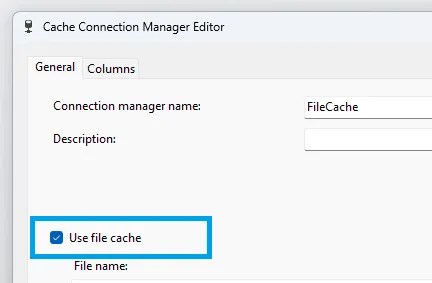
Setting this will ensure the cache file is written to disk and enables our use cases above. Here we’ll walk through how this can be used to separate the creation and usage of the cache.
Firstly we create a package to create the File Cache and populate it:
- Create the connection to the cache with the Use File Cache option above
- Define the structure for the cache in the Cache Connection Manager under the Columns tab
- Add a data flow to the package to retrieve data, and a ‘Cache Transform’ to populate the cache
When this package runs the File Cache will populate and write the data to disk. We’ll then have another package (or packages) which can reuse this cache as often as needed:
- Create another connection with the Use File Cache option, with the path being wherever the cache is located (or will be)
- Define the structure of the cache in the Cache Connection Manager to match exactly as it was defined originally
- Configure the Lookup transformation to use the Cache Connection Manager connection type and select your cache under Connection options
Note that as these packages are loading their cache from local disk rather than a remote data source, they should be quicker to load and result in faster packages.
The same warning applies here as with a regular cache, it is stale data from the point it was cached. With the cache being persistent, it can become an issue if it doesn’t get refreshed and the impact not noticed downstream.
Whilst this method of using the file cache is a great use case, there’s one more trick up its sleeve.
One more thing
In addition to the portability of a File Cache, there’s also another feature it brings over the top of a regular cache. It has the benefit of being used as a data source.
The File Cache can be used as a source in a data flow using the Raw File Source. This allows you to not only use the cache for lookups, but also for copying data between environments.
Example: You have a product list in a production environment which is used for a lookup in an ETL process. Change this to use a File Cache and you could take the same file and use it as a source to refresh the product data on a development environment.
Wrap up
In this post we’ve looked at a File Cache, how it differs to a regular cache, and how this really shines in specific use cases.
The fact it allows the cache to be shared across packages and environments can unlock the scenarios we highlighted here. The added bonus of being usable as a data source is the cherry on top.
Reusing the cache multiple times brings the same performance benefits as a regular cache. The File Cache goes a step further though and allows those benefits to be seen across multiple executions due the cache persisting.
Configuration of a File Cache is almost identical to a regular cache, so if the right situation arises its a very straight forward change to move to this approach.
 Andy Brownsword
3 replies on “Using a File Cache for Isolation, Performance, and Reusability in SSIS”
[…] Andy Brownsword makes those SSIS jobs run faster: […]
[…] final point about the File Cache we looked at last week. Where you don’t have (or want) direct access to the database, you need to ensure the file […]
[…] My background in SSIS featured heavily – from identifying bottlenecks, knowing where to look for solutions, to solving blocking, and optimisations including buffer sizes, caching, more caching, and even more caching […]