
Dealing with endless formats for SQL scripts is a special type of pain you get to enjoy as a data developer. With the arrival of SSMS v22.7 last week, we have a solution in the form of a T-SQL formatter which is now available in preview.
What’s new?
The ability to format scripts in the query window has been requested for the longest time. Individual styles, painful commenting, or simply bundling a statement onto a single line. All are pain points which a simple formatter can address.
Straight to the action, here’s the shortcut which matters:
Ctrl + K, Ctrl + Q
It’ll turn this:

…into this…

You can also right click and choose Format SQL (Preview). Both of these work for whole documents, or a highlighted section of code.
There’s a solid selection of customisation you can find under Options and SQL Formatter (Preview). It won’t correct capitalisation of field names (as you can see above), and there aren’t options for leading or trailing commas for example. But there’s a good chunk there for a preview.
Why it matters
Formatting is typically very personal, and more important across larger solutions or scripts where you want consistency and clarity. From an individual perspective, it’s a nice-to-have feature.
Where it’s more impactful is when you’re working in shared code bases or as part of a team. Having clear, readable, consistent code is key not just for developing and merging, but reviewing and troubleshooting too.
While database projects in SSMS are continuing to improve, their adoption is accelerating. Thankfully this feature aligns nicely as it supports solution configuration, so the whole team can adhere to the same formatting styles across the solution:
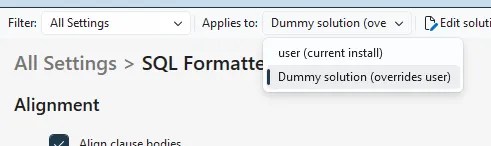
This means everyone working on the same solution is abiding by the same configuration to output the readable, consistent code we’re after.
If you want to take it a step further, consider the Format on save option to enforce this even more. This not only ensures consistency when manually formatting, it enforces it when saving scripts. It’s crucial that everyone is on the same page and using the right tooling for this or you might end up with some messy pull requests when formatting styles are fighting between team members. Approach with caution.
Alternatives
Formatting isn’t a new feature, and SSMS is quite very late to this party. A lot of us will have used alternatives for years…
The most comparable alternative is the Poor Man’s T-SQL Formatter which is available online or via various forks for VS / SSMS. This is a straight-forward formatter like the preview we have here. I’ve used this for those ‘this needs to be readable’ bundles of code over the years and it works great, but the SSMS extensions haven’t been maintained for years. If that’s all you use it for too, this preview removes the need and brings that ‘just do it’ functionality right into the IDE.
There’s also more heavy-hitting and all-encompassing tools like SQL Prompt. This is more than just formatting as it comes with better intellisense, code analysis, and refactoring to name a few. The functionality isn’t up to the same standard that SQL Prompt offers, but that’s the difference between a free preview-level offering and an established premium solution.
With that said, clearly SSMS is edging in the right direction with Co-pilot elevating intellisense (at least, having a go), and now the inclusion of formatting. SSMS doesn’t come close to the premium functionality or linting experience, but for those who don’t live and breathe SSMS, this might be just enough for now.
Wrap up
Formatting in the IDE – and out of the box – is awesome. This is another welcome (and long overdue) addition to SSMS.
There’s certainly enough here for a solid first experience, and removes the need for simpler extensions which were required previously. There’s opportunity for growth with plenty of options I’m sure the community will cry out for. However for an initial preview, and slotting in nicely with database projects, this is something I’ve found myself turning to daily to make life easier.
If you want to read more about this and other DevOps updates in the recent release, check out Drew’s post.
I’ll confess, I’m a trailing comma kinda guy. You might be a leading comma person, and that’s ok, because we’ll both format it our own way (eventually). I bet your toilet paper is mullet- instead of beard-style too isn’t it, you psycho.


One reply on “Formatting T-SQL in SSMS: It’s About Time”
[…] Andy Brownsword tries out a new feature: […]