Schema drift is an inevitable part of environments where database changes are applied manually. Sometimes it’s dev-ing in production, other times it’s lax change control. Either way you’ve got a problem, and SSDT comparisons may be the solution.
In this post I want to look at how using the Schema Compare and Data Compare features of SSDT can compare different environments to detect movements in schema and core data. The key points are consistency and specificity
Schema comparison
A bad schema doesn’t lead to oddities, it straight up breaks your app.
The Schema Comparison in SSDT has been battle-tested for years and it works really well. Point it at two versions of your database and you’ll see what’s changed and a side-by-side of the object to see where the specific differences are.
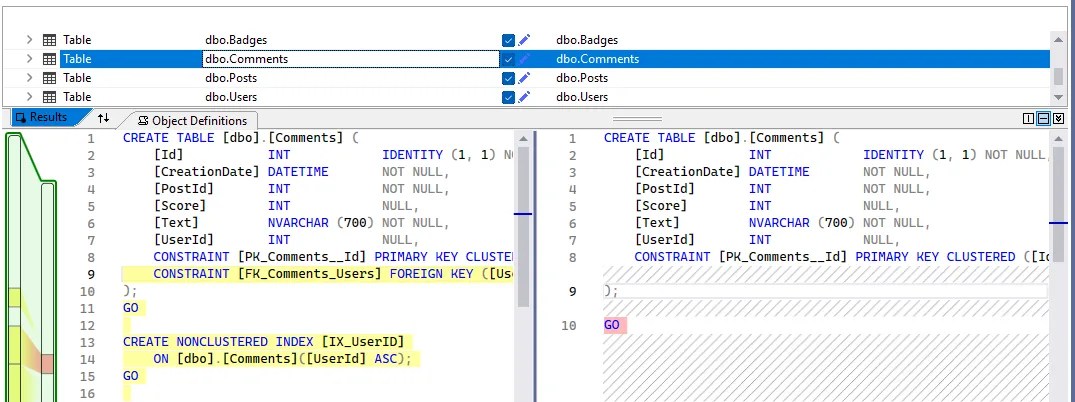
What’s really useful is that settings cog on the toolbar ⚙️. This allows you to specify exactly which objects you want to be comparing. For example if you’re focussed on purely the structure, you might want to exclude roles or role memberships. This customisation is perfect for comparing environments where you expect differences, such as different certificates.
Those same settings also have more granular control for specific object types, for example you might not want to ‘Drop indexes not in source’ if you’re comparing to an analytics environment where you’ve added columnstore indexes for instance. These settings are similar to those found in database project deployments which let you really fine tune the comparisons.
But these comparisons aren’t a one-off event. We’ve already established that drift happens so you’ll want to make them reusable. Simply saving them is all that you need – the copy will keep the database reference plus any customisations you’ve made through the settings. All ready to run at a minute’s notice. They’re stored in XML too so you could even source control them if you fancy.
With a consistent schema in place, we now want to get more specific with the data side.
I’ll quickly add that Schema compare was also recently added into SSMS (v22.7) if you prefer that interface over Visual Studio.
Data comparison
The data side is where you might want to be more granular. Tables containing enumerations – such as statuses – may need alignment, but transactional data can be ignored for comparison.
The Data Comparison handles that well. Where you’ve got tables or views where the schema matches, you can compare the data in them. This is why the schema comparison is an important first step.
Unlike a schema comparison where you can select different types of objects, a data comparison is done by selecting individual objects, so you can compare as many or as few as you need:
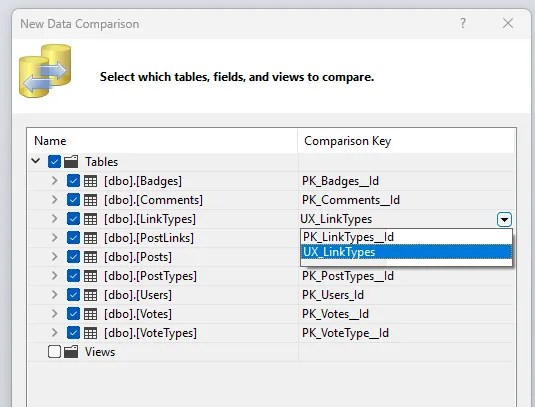
You’ll also see above that as I’ve got a unique index on this table, I can use that as a point for comparison. This is extremely helpful when you’ve got a surrogate key which may not be aligned between environments (think identity, GUID), but you have a unique natural key which can be used instead.
Simple to use, customisable, and you can save your Data comparisons – much like your Schema comparisons. However there’s a huge issue here. Saving Data comparisons does not save your customisation
Saving a data comparison literally only saves your connections. You can’t quickly replay for a specific configuration. If you need to tailor your comparison – such as ignoring transactional data – then you’ll need a different approach for reusability.
Consistent data comparisons
Finding the right approach for data comparisons in SSDT depends on your setup. The goal is to define an object which can be used for consistent comparisons without customisation.
One option is to provide a separate copy of the data which only contains the fields to compare, such as a standalone staging table. I’ll demonstrate the example using a similar approach through indexed views. We’ll use the tables below as examples:

First up, the Category table. As we saw above, having a unique index lets us use that as a point of comparison. So we’ll bake that into a view, such as:
CREATE VIEW compare.Category
WITH SCHEMABINDING AS
	SELECT CategoryName,
		CategoryDescription,
		IsDeleted
	FROM dbo.Category
GO

CREATE UNIQUE CLUSTERED INDEX CX_compare_Category
ON compare.Category (CategoryName);
GO
So with this approach, we’ve left out the CategoryID as it’s an IDENTITY which may differ between environments, and similarly the LastUpdated timestamp as that will depend on deployments and modifications. What is left are exactly the fields we’re interested in.
For the Section table, the solution is very similar but we’ve got a key difference here – the Foreign Key. The key relates to the IDENTITY column we ignored previous as it may differ. The solution for that is to bring the natural key into the child table, like this:
CREATE VIEW compare.Section
WITH SCHEMABINDING AS
	SELECT s.SectionName,
		s.SectionDescription,
		c.CategoryName,				/* Natural key from related table */
		s.IsDeleted
	FROM dbo.Section s
		INNER JOIN dbo.Category c ON s.CategoryID = c.CategoryID
GO

CREATE UNIQUE CLUSTERED INDEX CX_compare_Section
ON compare.Section (SectionName);
GO
This allows us to validate the relationship matches but crucially ignores environment specific variation from the identity column.
⚠️ A word of warning: this approach relies on the foreign key being NOT NULL. You can’t index a view with an outer join so if you have nullable keys, this approach doesn’t work. As I mentioned at the outset, the right approach depends on your setup.
Wrap up
In environments with manual deployments, emergency fixes or environment-specific values can lead to drift in your desired state. Through effective use of the Schema and Data comparison tools in SSDT, we can identify the drift precisely.
The schema comparison does a solid job for consistent comparisons thanks to being able to save configurations. This is where data comparisons fall short and need a little help.
Here I’ve demonstrated one method to help the data comparisons through indexed views. This allows us to compare specific columns which are important to us, and ignore what isn’t. You could choose a number of techniques though as different situations may be better suited for your data or environment.
Give it a try. If you haven’t compared your environments recently, you might be surprised by what you find.

