
As a database developer, when I started using Power BI, I was concerned about it retrieving reams of data only to perform transformations downstream. The Power Query editor misleads us into thinking the retrieval and transformations are applied sequentially.
Thanks to Query Folding, that’s not usually the case. And that gives us more power to extract performance from the database.
What is query folding?
As we build queries in Power BI we get data into a desired state by applying transformations via Power Query.
Query folding is the ability to take the transformations and fold them into the source query. Putting the logic into the query itself. This is a similar approach as predicate push-down in the SQL engine.
The goal is to move as much of the manipulation back to the data source, which makes the Power Query process lighter and more efficient. What this means for database developers is that we have more control in the database layer.
Demo
Here’s an example where I’ve applied some transformations on the Posts table in the StackOverflow database:
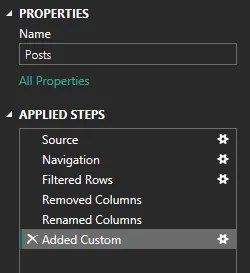
If we consider filtering, renaming columns, or adding a custom column with a calculation, we know they can be done within a query. If you want to see if that’s happening you can select a step and choose ‘View Native Query’:
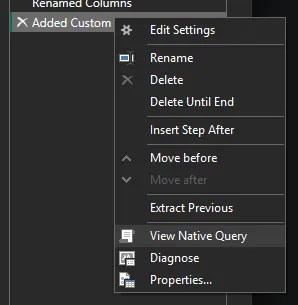
Then we’ll see the actual query that’ll be sent to the database:

Folding is very effective, so it can handle much more than what I’ve shown above, including sorting, grouping, and even joins when performing merges in Power Query. It’s pretty impressive.
If you don’t have the ‘View Native Query’ option available, that means folding has been broken at some point upstream. You can work your way through the transformations to find the last point the query is available, and the next step is what’s breaking it.
⚠️ If query folding breaks early in the transformations, this can slow down your model more than a suboptimal query
It’s not often I see a break, but a couple of simple examples:
- Text manipulation in Power Query. A ‘Replace Value’ transformation against text can be replicated into SQL, but changing to Proper case is done by Power Query so it can break folding
- Adding an Index column. If you’re looking for a sequence or row number and add the index, it only exists within Power Query so it can break query folding
If you need to use an action which breaks folding, consider if any transformations can be moved prior to the breaking transformation to help with efficiency.
Why this matters
Back to why this matters for database developers.
As mentioned earlier, Query Folding moves the logic back into the query. We won’t simply be scanning a table and returning the contents. The database will be doing filtering, grouping, sorting, etc.
This means the database is doing the heavy lifting, and that’s where we can start to influence the performance.
Whilst we won’t have the ability to change the query, we can get a copy of the exact query as we showed above, and tune against that. Typically these will be indexing changes, but you may have other strategies if you’re seeing conversions or functions being applied.
As a rule of thumb:
- Apply simple transformations like filtering or column changes early
- Check folding around major transformations to see if they impact (break) folding
- If folding breaks, move downstream transformations earlier if possible to allow folding
- Once the transformations are optimal, retrieve and tune the query
💡 Bonus: if you’re using incremental refresh against a large data set, you’ll want to have an index aligned to your range key. Without one, you’ll likely be reading much more data than you need to – which almost defeats the point of an incremental refresh
Wrap up
Query Folding is a powerful feature for Power BI, but it also lets SQL Server do what it does best.
Power Query doesn’t have to be a black-box solution we fight against. By understanding the feature and reviewing the native query, we can deliver improved performance.
Next time you’re investigating a slow refresh, check whether the query is folding as you’d expect, and then get to tuning it just like you would any regular SQL query.


3 replies on “Query Folding in Power BI: Leveraging SQL Server Performance”
[…] Andy Brownsword explains one performance improvement technique for Power BI data transformations: […]
[…] recommended to keep this transformation early in the sequence to take advantage of Query Folding if the source supports it. In this example I can see the filter is included when the database is […]
[…] within your Lakehouse. Specifically, a subset of Power Query commands – the ones which support query folding. It’s a novel way to design your queries for sure, a fun find, even if it’s not one […]