
If you have a Self-Hosted Integration Runtime (SHIR, or IR for short here) on an Azure Virtual Machine (VM), there’s a cost to keep it online. When used intermittently – for example during batch processes – this is inefficient for costs as you’re paying for the compute you don’t need. One way to alleviate this is by controlling uptime of the environment manually, only bringing it online for as long as needed.
In this post we’ll demonstrate how to start and stop an Azure VM containing the IR through the Azure Management API from within a Data Factory pipeline. If you’re only needing the IR for 1h/day then keeping it deallocated for the remaining time can slash compute costs by over 95%.
And it’s pretty easy to implement.
Controlling the VM
Azure resources can be controlled through the Azure REST API, which exposes a vast amount of functionality. For this example we’re going to control the VM through Data Factory pipeline and make sure the IR is available before we want to start using it. The specific calls we’ll be using here are:
- Starting a VM to bring the environment online
- Data Factory Integration Runtime Status to ensure the runtime within the factory is available
- Deallocate a VM to offline the machine and deallocate to pause compute costs
The API requires whichever flavour of Entra authentication you fancy. You’ll need to ensure that these credentials have appropriate roles against the resources to call the API:
- Access to control the VM, for example
Virtual Machine Contributorrole to allow starting and deallocating - Ability to read Integration Runtimes within a Data Factory, which is a subset of the
Readerrole, as no actions are taken directly against it
Let’s put this into action.
Automating the VM
We’ll start with the VM – being able to bring it online, and deallocating once we’re done with it. The pipeline should be generic so we’ll include parameters for the SubscriptionID, ResourceGroupName, and VMName which are needed by the API. There should also be a parameter for the action, say Command, which would either contain ‘start’ or ‘deallocate’.
With the parameters in place, the only operation needed in the pipeline is a Web activity. An expression will create the URL from the provided parameters, we’ll issue a POST with an empty body, and the authentication will need to be set based on your preference above:
@concat('https://management.azure.com/subscriptions/',pipeline().parameters.SubscriptionID,'/resourceGroups/',pipeline().parameters.ResourceGroupName,'/providers/Microsoft.Compute/virtualMachines/',pipeline().parameters.VMName,'/',pipeline().parameters.Command,'?api-version=2020-12-01')
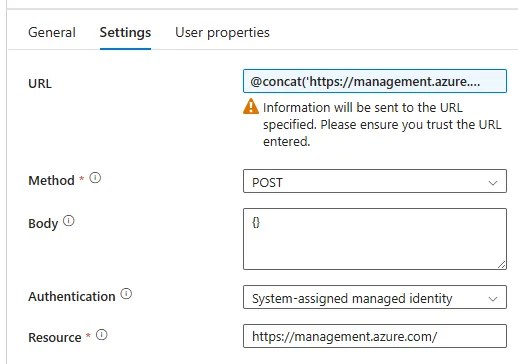
That’s really all there is to it. Depending on the Command parameter provided, the API endpoint will be changed to either start or deallocate the VM. You may opt to have separate pipelines which explicitly call start or deallocate if you’re concerned about anyone injecting different commands (such as delete 😮).
If you’ve got a busy IR being shared across multiple pipelines or factories, you may need a coordination mechanism to ensure the VM doesn’t get shutdown prematurely, but that’s out of scope for what we’re dealing with here.
Monitoring the IR
The downside of a cold start to the VM is that the IR can take a couple of minutes to come online, so it isn’t usable immediately. To avoid this, we’re going to have another pipeline using the same API to monitor the Data Factory until the runtime is ready and we’re clear to proceed.
Again the pipeline is generic with parameters for SubscriptionID, ResourceGroupName, DataFactoryName, and IRName. Inside the pipeline, functionality is encapsulated by an Until loop which can iterate until the IR is online.
Inside the Until loop we’ll only need a few activities:
- Web activity to retrieve the status of the IR
- If Condition to facilitate a delay with a Wait activity if the IR isn’t online
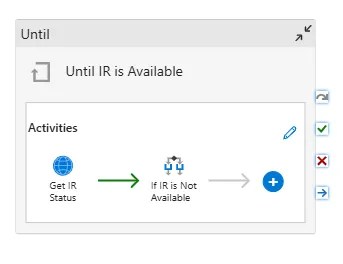
Starting with the Web activity, it’s much the same as above but using a different URL for the API:
@concat('https://management.azure.com/subscriptions/',pipeline().parameters.SubscriptionID,'/resourceGroups/',pipeline().parameters.ResourceGroupName,'/providers/Microsoft.DataFactory/factories/',pipeline().parameters.DataFactoryName,'/integrationRuntimes/',pipeline().parameters.IRName,'/getStatus?api-version=2018-06-01')
This will retrieve the current status of the runtime and various properties for it. If the IR isn’t yet online for us, we want to pause before re-checking. This is where the If Condition is used with the expression:
@not(equals(activity('Get IR Status').output.properties.state,'Online'))
Under the True case, a Wait activity can be added for the desired delay before we loop again to recheck.
Circling back to the Until loop, the Expression driving that is the opposite to our If Condition:
@equals(activity('Get IR Status').output.properties.state,'Online')
With the complete pipeline, this can now be added after the VM start has been called to ensure the IR is online before we attempt to make use of it.
Wrap up
In this post we’ve automated start-up and shutdown of an Azure VM hosting a Self-Hosted Integration Runtime to cut compute costs when it’s only needed intermittently.
The approach suits scheduled or batch workloads where a short warm-up delay is acceptable. We implemented it through Data Factory pipelines, but the same pattern applies across other Azure services using the Management API.
Deallocating the VM eliminates compute charges, while storage costs remain. The greater the downtime, the greater the saving — though if your IR runs constantly, a reservation may be more cost-effective.
It’s a simple, low-effort way to make Azure pay for only what you use.
 Andy Brownsword
One reply on “Reduce Uptime and Costs for Azure Hosted Integration Runtimes”
[…] Andy Brownsword saves some quid: […]