We’ve previously looked at how to implement vertical partitioning and the benefits it can bring within our data. Here I’d like to dive a little further into improving the performance even further with a couple of modifications to our schema.
We’ll use the same setup as we had previously to create the table, populate it and partition it. This results in a sort of parent-child arrangement where we have our core data in a parent table with child tables (one in our case) to store the data we’ve split out.
So let’s jump in and see how we can improve things further.
Referencing only the child data
With our data split across multiple tables there may be instances where we only want to reference the data in one of the child tables. For example if we only wanted to look for the translations for today’s date we could do the following:
SELECT LongDateStringFr, LongDateStringEs, LongDateStringJp
FROM dbo.CalendarDimension
WHERE LongDateString = FORMAT(GETDATE(), 'dddd dd MMMM yyyy');
Clearly a terrible way to write the query – but to illustrate the point – we’d expect to be scanning our translations here. That’s not all we do unfortunately. If we look at the statistics and execution plan we’ll see that we actually touched both tables still:
Table ‘CalendarDimensionCore’… logical reads 2, …
Table ‘CalendarDimensionStrings’… logical reads 1675, …
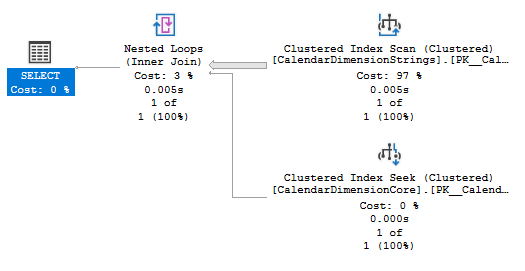
The reason for this is that in our view we tell SQL Server to perform an INNER JOIN between the two tables. In it’s current structure the SQL Server engine doesn’t know that the two sets of data are related – we could potentially delete data from one table without consequence on the other.
We want to be able to tell SQL Server that if a record exists in our child table that the core table will always have a record present. That sounds a little like a foreign key? Let’s try adding one of those to the table:
ALTER TABLE dbo.CalendarDimensionStrings
ADD CONSTRAINT FK_DateID
FOREIGN KEY (DateID)
REFERENCES dbo.CalendarDimensionCore (DateID);
If we now run our query again we shouldn’t need to check the core table to make sure the record exists, we can focus solely on the child table:
Table ‘CalendarDimensionStrings’… logical reads 1675, …
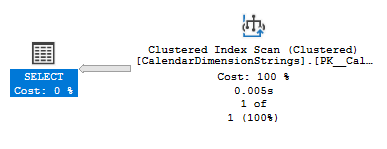
That looks much better for our query plan and also the amount of data we need to interrogate.
Referencing only the parent data
There are other instances where we may only expect to reference the data in our parent table, however as we’ve seen above the join between our data can cause complications.
An example of where we may see this would be where we want to perform a COUNT on the number of records in our set of data. With our original setup the execution plan would looks like this:
SELECT COUNT(1)
FROM dbo.CalendarDimension;
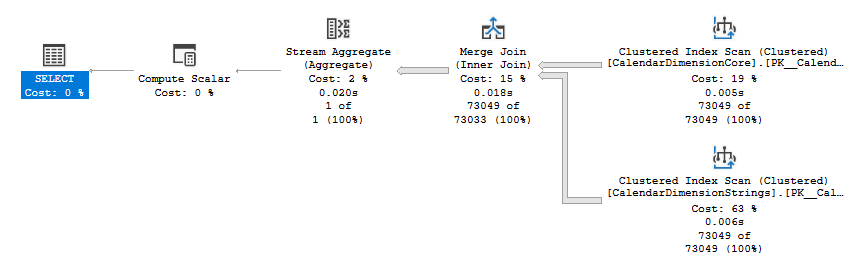
Table ‘CalendarDimensionStrings’… logical reads 1675, …
Table ‘CalendarDimensionCore’… logical reads 427, …
That’s not something we’d like to see when we’re only after a quick record count. Now if we add the foreign key from above this does help somewhat:
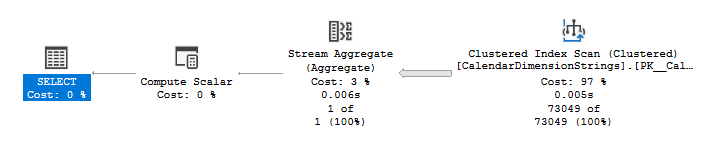
Table ‘CalendarDimensionStrings’… logical reads 1675, …
That’s clearly better in that we’ve removed one of the tables. However we’re now counting the largest of the two tables, why not simply count the records in the parent table?
The reason why is that the foreign key only enforces that there must be a record in the parent table for each child record, not the other way around. This is why the count is done on the child record as the engine knows there must be a parent record present for those entries.
In our instance we know that we have the same number of records on both sides and for the purposes of this example we will assume that our application logic would continue to maintain the tables in this way.
Based on that we can tell the engine that we aren’t concerned whether the child table contains all of the entries which are present in our parent / core table. We know the records will align so can take that away from the engine.
We’ll make that change by changing our INNER to a LEFT join within the view:
ALTER VIEW dbo.CalendarDimension
AS
    SELECT
        c.DateID,
        c.CalendarDate,
        c.ReportingPeriod,
        c.SortableDateString,
        s.LongDateString,
        s.LongDateStringFr,
        s.LongDateStringEs,
        s.LongDateStringJp
    FROM
        dbo.CalendarDimensionCore c
        LEFT JOIN dbo.CalendarDimensionStrings s
            ON c.DateID = s.DateID
GO
Now with that change let’s see how our query runs:
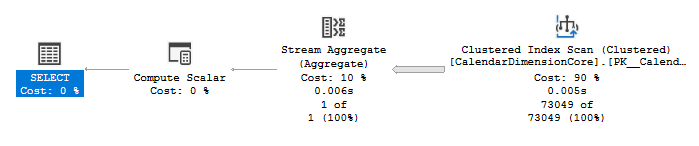
Table ‘CalendarDimensionCore’… logical reads 427, …
We still need to count every record in the table but now that we have a LEFT join in place we’re able to count the smaller core table which has narrower records and we can get away with only 427 logical reads compared to the 2102 and 1675 which we saw previously.
Wrap up
Vertical partitioning can be a great option for allowing us to not only manage our data more effectively but also to provide improved query performance. The tips here are to show options for making relatively small adjustments to the database schema which can help eek out even more performance benefits.
We’ve effectively provided the SQL Server engine with more information about our data which will allow it to make alternative / better choices with how it can execute these queries. If you’re considering considerable schema changes like vertical partitioning it’s worth taking the time to look at how the structure can be tweaked to provide the engine with more understanding of your data to provide different options for execution.
How have you liked this little series on vertical partitioning, is it anything you’ve utilised before or are thinking of in the near future?
 Andy Brownsword
One reply on “Performance Enhancements for Vertical Partitioning”
[…] partitioning. More details about vertical partitioning, how to implement it, the benefits, and performance improvements can be found in previous posts for […]