
Retries are a useful part of resilient pipelines. However, retries aren’t created equal, so I want to dive into recent changes to pipeline activity retries and the benefits they bring.
The issue
Failures happen, so we have retries to have another chance (or few) at completing the activity. They look something like this:

These fixed retries have challenges for which there’s no ‘better’ option:
- Short retry intervals work well for transient issues where the failure may be momentary, but for extended issues retries can be exhausted before the service can recover, plus they can add unwanted load in a retry storm
- Long retry intervals better handle extended issues such as resource exhaustion, but for momentary issues these create lengthy delays in pipeline execution, and for irrecoverable failures can drastically delay pipelines for larger retry volumes
I’ve had issues with intervals that are too short, where failures have cascaded due to retries being exhausted too fast. Conversely, I’ve had longer delays impact and overrun pipelines due to failures which wouldn’t be resolved during a retry window, such as a service being offline.
It was a case of pick your poison, until now.
Exponential back-off
In the recent monstrous September 2026 update we had Increasing Delay (also known as back-off) retries added as a more effective option which blends the two into a more robust solution.
Increasing Delay does exactly what it says – taking a minimum and maximum retry time, it’ll progressively increase the delay for subsequent failures:

This can be used to handle situations which are transient or require recovery time:
- Short-lived failures clear within the minimum interval, getting the pipeline moving again quickly
- Moderate issues will be picked up by the increasing delay, without overloading the target with fast retries, and avoiding excessive delays from longer intervals
- Long duration outages are less likely to outlast the retries, and the increasing delay will eventually arrive at its limit for the most severe outages
There’s still a need to understand the appropriate values for the minimum and maximum delays depending on the activity, but at least we don’t need to find a one-size-fits-all.
What’s also great about this implementation is that the delay is randomised within the target range, which mitigates the thundering herd effect when pipelines run in parallel.
Retry conditions
Back in June we also had Retry Conditions landing in preview. Conditions define when retries should take place and give us a tool to stop retrying irrecoverable failures.
As an example, if a web request returns 429 Too Many Requests, you could retry at a later point. However, if you receive a 400 Bad Request due to a malformed payload, would you really want to retry?
This is where retry conditions deliver smarter retries:
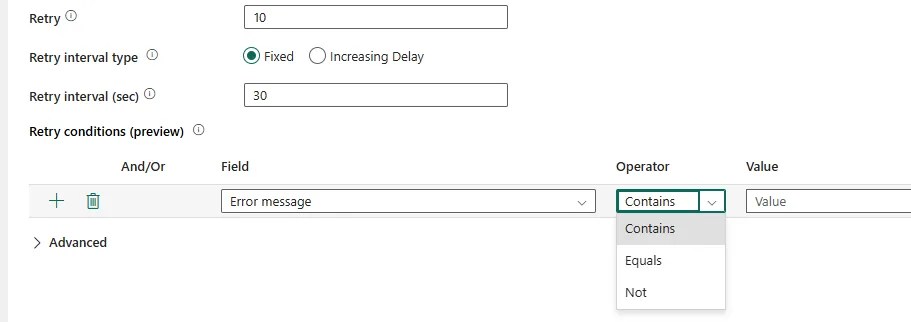
For the Field we can choose from Error message, Failure type, or Error code (like our HTTP statuses above), and the operators are Contains, Equals, and Not.
Using our examples, you may have conditions like Error Code > Equals > 429, or Error Code > Not > 400.
The first will continue to retry whilst we’re waiting for the limit to reduce. The second will abort due to a bad payload which simply retrying won’t resolve.
The documentation says this feature isn’t currently available for all activities, but I’ve seen it available on the common (and a few less common) activities, so you should be good to go in most cases.
💡 Note that the interval will run before the condition is evaluated so if you want to make use of Retry Conditions to drop out early, you should consider a shorter interval, or at least a short minimum if you want to back-off to longer retries.
Wrap up
With the new retry features for pipeline activities we’re able to retry and react smarter to failures. These features help us avoid impacting the performance of our pipelines or targets of our activities:
- Increasing Delay helps us balance for both transient issues and longer outages
- Retry Conditions let us react smarter to the failures causing the delay and short-circuit where a retry won’t resolve
Activity retries in pipelines have historically been a balancing act with the simple choice of shorter or longer retries. These two new features elevate retry functionality and will be welcome for teams heavily using pipelines for orchestration, albeit with the caveat that Retry Conditions are still in preview.
So for your pipelines that have suffered from issues caused by retries, it’s time to revisit their retry logic. I’d also argue that where you don’t have known recovery windows such as failover, Increasing Delay should be a default approach for retries.
If at first you don’t succeed, retry, retry again.

