Pipeline sequences are a common orchestration pattern, and chaining them allows us to decompose processes into manageable chunks. Here I want to look at 3 ways to achieve this chaining in Fabric and how they compare.
Invoke pipeline
The default option is the native Invoke Pipeline activity.
This allows us to call pipelines wherever they reside – Fabric, or even Data Factory and Synapse. In Fabric we’re able to call across workspaces, such as if you’re using separate ones for each layer of your Medallion framework. Super flexible.
Another useful benefit comes in the monitoring where you have visibility of work done through the child pipelines, for example:
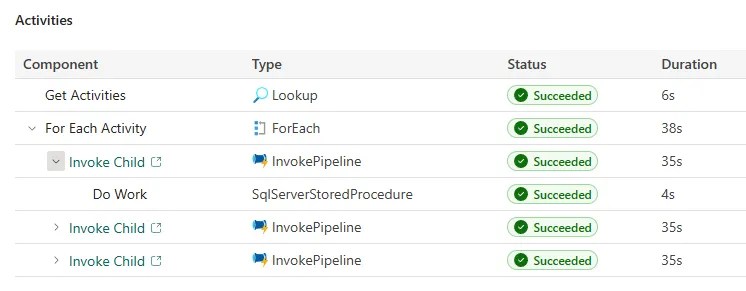
The experience is much richer than what we’ve previously used in Data Factory or Synapse, and makes troubleshooting much simpler.
Compared to previous flavours, there’s extra legwork setting up a connection and authentication. However, it’s this method which enables cross-workspace connectivity and calls to external pipelines, so it has value.
This is the go-to activity for pipeline chaining and is a natural evolution of what we’ve had in the past. But is it always the right choice?
Invoke pipeline (legacy)
Whilst the new Invoke Pipeline activity has all the bells and whistles you expect, the Legacy activity is your trusty old Data Factory-esque implementation.
This means we’re limited to pipelines in the same workspace, and we don’t get the rich experience from the monitoring. For example:
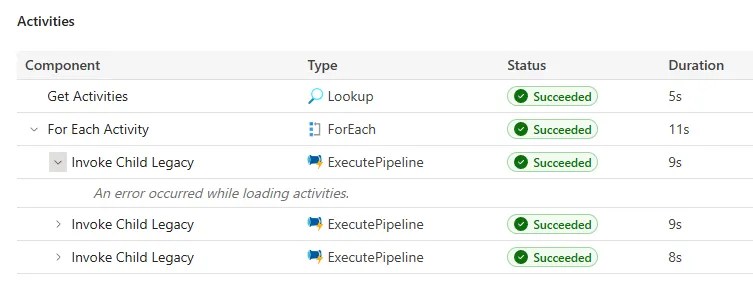
You’ll see we don’t get visibility of those activities inside the child pipelines. What’s worse is that executions for the child pipeline aren’t shown in the run history, you need to drill from the parent execution.
So why would we even bother with these? Performance, that’s why.
Comparing the snips above you’ll see the duration for the invoke is dramatically reduced from 35s to 9s with the legacy activity.
For heavily metadata-driven frameworks, a vast number of invocations can be needed due to the crippling limitations around nested control flow which have existed since Data Factory pipelines. When heavily relied on, this time saving adds up quickly. That’s why this is still a preferred option for some folks.
I recently saw a Reddit thread where Mark Kromer stated this legacy approach will be announced for deprecation “soon”. However, it was also stated that performance should be similar now between the native and legacy invoke activities, which as we’ve seen above isn’t quite the case yet.
Where you’re dealing with large chains of pipelines, there may be instances where you want to revert to the legacy activity whilst waiting for performance on the native implementation to catch up. Whilst it might solve performance issues, you may want to roll some of your own monitoring to help with troubleshooting.
Event based triggers
Where the options above are great for directly dependent orchestration – such as ETL / ELT processes – we also have the option to use event based rules, such as triggering when data arrives.
Historically we had storage events to trigger pipelines but in Fabric that’s expanded greatly. We can still use blob storage events, but now we have additional sources including capacity operation events for monitoring, OneLake events for data availability, and job events to react to their execution.
Event triggers are particularly useful when you have loosely related workflows. I’ve seen instances of reporting being tied into ETL processes as there’s a dependence there, but their production is a separate workflow which doesn’t need to bloat the data processing. Event triggers are a great fit to allow decoupling of the processes but still retain a dependency.
A drawback of event triggers is lost visibility of dependencies, as it’s linked to the activator rather than the item which is triggering the event.
Whilst multiple dependencies can easily be achieved with a pipeline workflow, that’s not the case with event triggers. However, with the recently-in-preview run conditions you can achieve a similar result.
Wrap up
In this post we’ve looked at 3 prominent ways to chain pipeline execution in Fabric. In summary:
- Use the Invoke Pipeline activity as the go-to for calling pipelines. Full functionality, performance overhead
- Invoke Pipeline (Legacy) is used when performance is paramount, with awareness of the drawbacks and potentially imminent removal
- Event based triggers for related work which doesn’t need to be bound into the same process
If in doubt, the regular Invoke Pipeline is a solid choice. Fully featured, detailed monitoring, and explicit lineage. A great starting point which could migrate to another option if there’s justification down the road.
The legacy invoke is the most divisive option as there’s a very clear tradeoff in its usage, but it’s on borrowed time. Personally, I’d much rather they solve the nested control flow activities to avoid over-reliance on Invoke Pipeline activities in the first place. A guy can dream, right?


One reply on “Three Ways to Chain Pipelines in Microsoft Fabric”
[…] Andy Brownsword busts out the duct tape: […]