
When designing tables in a Synapse Dedicated SQL Pool, I initially focussed on the ‘SQL’ and not so much the ‘pool’. How tables are stored is fundamentally different to other Azure SQL offerings, so it’s easy to get tripped up and impact efficiency and performance.
Let’s see how the SQL pools work differently and how to tailor your tables for optimal performance.
Distributed table architecture
The headline here is that your data is split across 60 buckets, and you want to design around that.
For typical SQL databases, you have an environment comprising storage and compute resources – one logical unit. In Synapse that changes, and you have nodes (compute) and distributions (storage, and query processing).
Nodes are variable, and you can scale up your Data Warehouse Units (DWUs) to increase these. Distributions, however, are fixed. You’ll always have 60 distributions, and they’ll be evenly spread across your nodes. Although distributions may reside on the same node, their query processing is isolated.
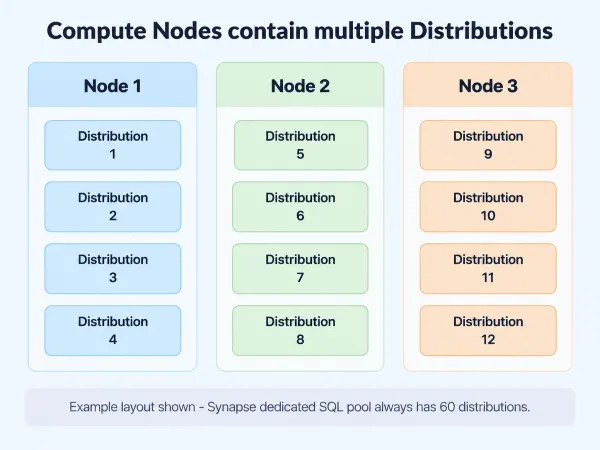
Using the image above, imagine the record for Customer A is in distribution 3 and their Sales are spread across distributions 4, 7, and 9. To join these, Synapse needs to copy the Customer record to the distributions which need it.
Moving data is slow compared to having it in the same distribution. Thankfully we can choose how our data is distributed. Choosing an effective distribution minimises data movement, so let’s look at different approaches and where they fit.
Replicated tables
When we want to ensure a table is easily available for all distributions, we use a Replicated table. When set up as Replicated, a copy of the table is available on every node and so is ‘local’ for each distribution.
Tables are created including this syntax:
...
WITH (
    DISTRIBUTION = REPLICATE
);
Having a copy of the data close to each distribution removes the need for data movement across nodes. Dimension tables in a data warehouse are a typical use case for Replicated tables. Having these close to all fact tables helps query performance.
The downside of Replicated tables comes from the duplication of their storage as there’s one copy on every node. Tables which are smaller in size and growth rate are better suited for this reason, hence Dimension tables being ideal candidates.
Round-robin tables
Round-Robin tables are the scatter-gun approach. Data will be spread across all distributions with the goal of an even distribution regardless of content. These are commonly seen as they’re the default setting, and well suited for staging tables as they’re quick to load data.
They’re set up like this:
...
WITH (
    DISTRIBUTION = ROUND_ROBIN
);
Round-Robin tables help by spreading workloads evenly across all distributions, so in addition to fast loading, they can be effective for transformation workloads too. This is why you see Round-Robin tables used extensively for Bronze and sometimes Silver layer tables.
The drawback of having the data separated indiscriminately is that when trying to perform a join to a table which isn’t Replicated, you’ll almost certainly incur a movement cost to retrieve data from another node or distribution. This was the issue in our example above.
Hash distributed tables
When we want more control over how data is distributed, we turn to the Hash Distribution. This uses a hash to ensure that rows with the same value will always reside in the same distribution.
For example, hashing based on a customer would look like this:
...
WITH (
    DISTRIBUTION = HASH([CustomerID])
);
The particular benefit is knowing that common values reside together, such as columns which are frequently used for GROUP BY operations. Hash Distribution also benefits JOIN operations between Fact tables which share the same Hash Distribution on the join key.
The trade-off for Hash distribution is the overhead to hash the data prior to storing it. The cost is felt during table population, while the benefits show up during querying if designed well.
The goal is for the hashing to provide an even distribution similar to Round-Robin. Hash distributed tables should be monitored to ensure data isn’t becoming skewed. I’ve seen instances where 100s of unique values only spread across a small number of distributions due to skew from the resulting hash.
Wrap up
Storage in Synapse is very different from a traditional SQL implementation and understanding distributions is key to extracting peak performance. Choosing the right distribution for each table comes down to this:
| Distribution | How it Works | Suited To | Gotchas |
|---|---|---|---|
| Replicated | A copy on each node, close to all distributions | Dimension tables | Storage overhead |
| Round-Robin | Even distribution, random ordering, fast loading | Staging and transformation tables | Joins likely move data |
| Hash | Controlled distribution, based on prominent JOIN or GROUP BY key | Fact tables | Distribution can be skewed |
You could let Synapse default to Round-Robin and simply move data around. With only 3 choices for distribution though, it’s worth a conscious review of tables and workloads to make a better choice. It’ll save you (processing) time in the long run.

