
Last week we looked at the medallion architecture so I wanted to follow up by diving a little deeper into the Bronze layer by taking a practical example to compare options for retrieving data.
Fabric provides a number of ways to bring data into the platform. Here I’ll sample 4 specifically:
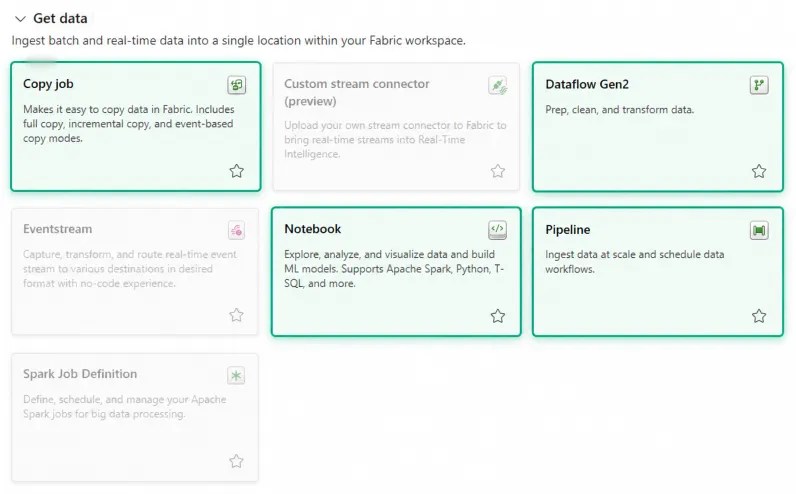
For this example I’ll use NHS monthly prescribing data which provides us with a large CSV, and we’ll copy it into a Lakehouse. For the Bronze layer we want to retain data as close to source as possible, so simply retrieving the file and retaining the CSV is the goal.
I’ll compare the options for this specific use case, with multiple runs for each. So, let’s see how the options stack up.
Pipeline copy activity
The simplest option is a Copy Activity within a pipeline, the same way we’d handle this in a Data Factory. We set up the source and destination, and let it rip:
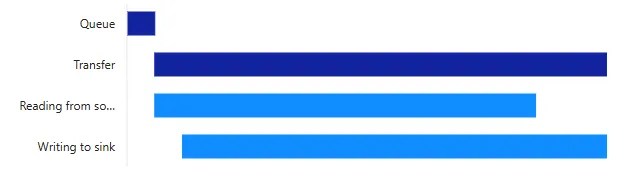
For the latest dataset (July 2026, 7.25gb), the average run duration was 1m 55s with Fabric reporting throughput of 70mb/s.
This example is as straightforward as we can get; a binary copy of the CSV file straight into the Lakehouse. Using this as part of a pipeline lets us retrieve the data unchanged, and the activity can use expressions to make it reusable.
Pipelines and activities are the bread and butter for ingestion. They’re flexible for a variety of sources, and configurable enough for most use cases. This is the benchmark: ⭐⭐⭐⭐⭐ for this example.
Copy job
Next up we have the Copy Job, which takes the Copy Activity out of the pipeline and makes it a first-class item in the workspace. In this instance the same connections could be reused from the Copy Activity, so performance is comparable:
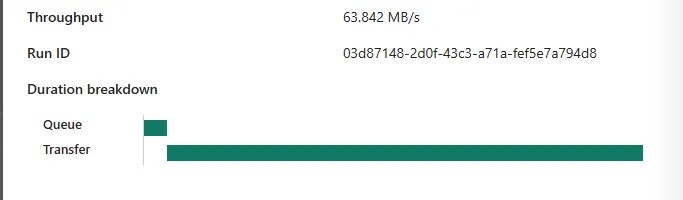
Execution averaged out around 1m 56s with throughput reported at 68mb/s. A negligible difference. It’s how the job works in comparison which brings two big differentiators:
Firstly, the job approach can manage incremental loads which would need to be manually built into the Copy Activity and its pipeline. If the source dataset supported filtering, we could use the incremental function to refresh only the newest portion of data rather than needing to retrieve the whole dataset and identify the delta ourselves.
Secondly, parameterisation, or lack of in Copy Jobs. When using activities we’re familiar with parameterisation and reuse, for example metadata-driven frameworks and dynamic orchestration. Copy Jobs aren’t well suited to this approach because runtime parameters aren’t available for dynamic reuse.
Performance is still solid, and we’re retrieving the source data unchanged so we’re adhering to our Bronze layer principle. However, in this case the incremental benefit isn’t relevant, and the lack of parameterisation limits its usefulness as the dataset filename changes each month – an unfortunate ⭐⭐⭐.
Notebook
Notebooks and Python allow a vast amount of functionality and flexibility, and whilst they’re primarily used for transformation work, they can be beneficial for complex ingestion requirements.
Our example is simple so we’ll stick to requests.get to grab the data and stream into the Lakehouse files. Using the latest 2.0 runtime it takes an average of 2m 55s, so not quite as performant as the Copy Activity and Job approaches.
Performance aside, the customisation which Notebooks provide can be vastly superior to the alternatives for more complex use cases. Even for more trivial instances like this one, if your team has a strong Notebook preference and are able to effectively reuse these snippets of code, they can be a viable choice.
For this example, given its simplicity I’d argue Notebooks are likely overkill, and performance trails the other options by a margin. However, their reusability and flexibility could be useful for web scraping and parameterised downloads. A solid ⭐⭐⭐⭐ for me.
Dataflow Gen2
The last option we’ll look at is the Dataflow. Similar to the Notebook it has broad functionality and is more typically associated with transformations, but rather than requiring code like the Notebook, it does all of this in a visual low-code interface. Let’s see how it holds up:
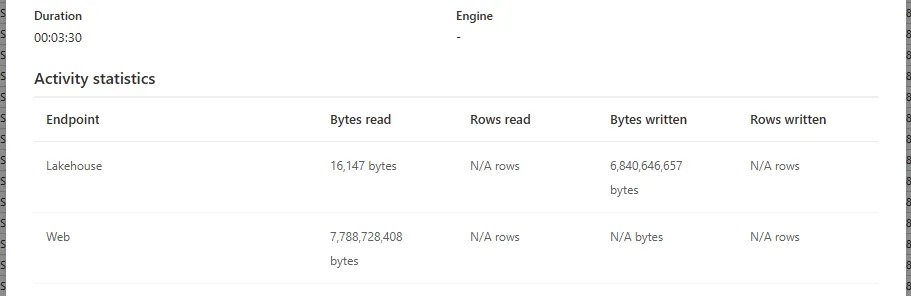
The transfer time averaged 3m 25s which is the slowest of the options we’ve looked at. But there’s more to this story.
With the Copy Activity, Copy Job, and Notebook, we were reading the source and writing directly to the Lakehouse. With a Dataflow, it’s parsing and re-serialising records rather than simply a binary copy as we’ve seen above.
We can see the impact this has when we compare all the destination files:
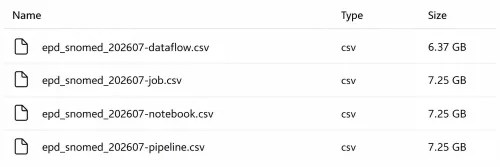
One is not like the others.
The Dataflow has produced a much smaller output through its reformatting. There could be a number of explanations for this, and size difference alone doesn’t prove that data was lost in the process. However, this fundamentally breaks what we want to achieve in a Bronze layer to keep the source data in its rawest format.
Again, like Notebooks, a Dataflow is overkill for a simple ingestion task. In this example, regardless of its suitability, source data was ultimately rewritten. At best a lowly ⭐ for the ingestion here.
Wrap up
In this post we’ve covered a variety of ways to ingest data with a specific use case, and ranked them relative to our sample web-based flat file. In summary:
| Option | Fidelity | Duration | Reuse | Verdict |
|---|---|---|---|---|
| Copy Activity | High | 1m 55s | High | ⭐⭐⭐⭐⭐ Best fit, all-rounder |
| Copy Job | High | 1m 56s | Low | ⭐⭐⭐ Good but static |
| Notebook | High | 2m 55s | High | ⭐⭐⭐⭐ Flexible but excessive |
| Dataflow | Low | 3m 25s | Med | ⭐ Avoid for flat-files |
In this test the Copy Activity is a solid winner. Our aim was clear: preserve the source data as closely as possible, which 3 of the options achieve. As part of a wider solution, performance and reusability matter too, and the Copy Activity shines there as well.
This post isn’t designed to say the other options lack clear use cases, they certainly have them. Personally though, I find the Copy Activity suffices for most implementations, and when there’s a need to deviate from that, I use it as the benchmark to challenge the alternatives against.


One reply on “Comparing Bronze Ingestion Options in Microsoft Fabric”
[…] Andy Brownsword loads some data: […]