
I’ve had Fabric gnawing at me for too long. Whilst I’ve dabbled in a couple of areas, I haven’t taken the time to explore the breadth of what Microsoft’s flagship data platform offers. That is, until I recently took the plunge.
For those who may be in the same position, I wanted to share the key areas and interesting points I discovered in my time with the platform.
Parquet flooring
Parquet is the default for most of the data you’ll be storing. Whether it’s staging data in your ETL, or storing your gold layer in a Lakehouse, parquet is the format of choice. If you’re not familiar with the parquet format, your data is stored and retrieved based on columns instead of rows, which makes it really fast when you only need a subset of data.
Additionally, these parquet files are stored in Delta Lake format – like the classic Data Lake plus a transaction log similar to SQL Server. This enables efficient updates and deletes which are ideal for incremental loading patterns.
The final point here is Liquid Clustering which sounds cool, shout out to whoever came up with that gem. It organises your data by a specific field to improve search performance. But, you don’t have to define it when a table is created, it can be done after the fact, and with the right configuration is maintained automagically by Fabric.
Friction-free ingestion
The usual pattern for ingestion is to grab data from source, and bring into your platform to work with. Under the right conditions, this is vastly simplified with Fabric – by removing the need for it.
For solutions in Azure SQL DB, you have Fabric Mirroring available which automatically mirrors the data into your Fabric tenant. This means no ingestion is needed and it’s ready to be transformed whenever you need it. This essentially uses the transaction log to mirror the data rather than impacting your OLTP solution by reading from the database directly.
Next up are Shortcuts. They’re pointers to data sources which allow remote querying without the need for ingestion. This includes Fabric resources such as other Lakehouses, external ones like Dataverse, and 3rd parties including Amazon S3 buckets.
Fifty shades of querying
Fabric supports a variety of languages in different forms, but from a querying perspective we’ve got some familiar tools to hand.
Lakehouses provide a SQL endpoint for read-only access to tables. Because they’re not tables as we’d typically think of them (Parquet, as mentioned), syntax is minimised so we can’t update them or deploy indexes. However, what we can do is create views, procs, and functions to support, so it’s not all bad.
Moving over to Eventhouse, the data is stored in what looks like tables, but they’re a different beast. They’re designed for fast ingestion and streaming data, similar to Log Analytics if you’re used to that. In the same way, these use KQL for querying rather than SQL queries. That’s different syntax to get your head around, here’s a primer if you want an intro.
Finally – and the most surprising find – was the Visual Query which is exactly what it sounds like:
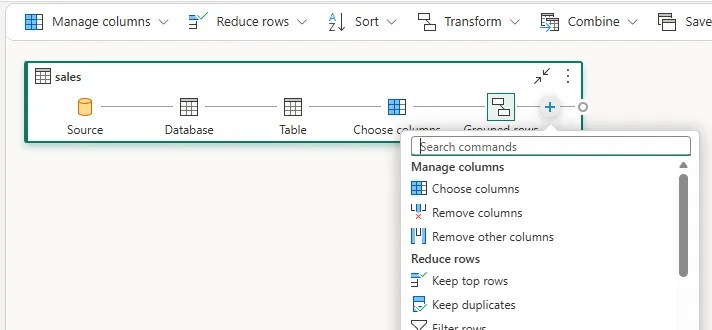
You visually lay out the transformations for data you’re retrieving. The transformations might look familiar too, it’s Power Query in action within your Lakehouse. Specifically, a subset of Power Query commands – the ones which support query folding. It’s a novel way to design your queries for sure, a fun find, even if it’s not one I’d use often.
OneLake to rule them all
Finally, it’s OneLake. It’s everywhere, literally. It’s the storage layer across your tenant, and underpins everything above.
That means your data resides in one place which removes silos or data sprawl. Your storage will be used across capacities (Fabric instances), and Workspaces (containers for data, reports, etc.), but it’s the unified platform underpinning them all. That sounds promising.
A huge advantage I see with a shared storage platform is lineage. When data is spread across locations, it’s a challenge tracking lineage end to end. Having all your analytics from raw-to-gold in a single storage layer greatly simplifies that. Fabric consolidates that context which provides more confidence to the outputs from AI tooling available in the platform.
With the performance improvements arriving from Fabric Runtime 2.0, I knew it was time to jump in. Fabric isn’t just the new shiny toy, it’s a material step forward with Microsoft’s data offerings, and I’m looking forward to diving deeper.
Here I’ve covered a few areas which stood out to me and may be of interest to those who haven’t taken the plunge yet either. If any of those sound interesting and you want a broad introduction, I’d try out the Get started with Microsoft Fabric path in Learn which also includes exercises to try yourself.
There’s a whole other level with the AI and Fabric IQ tooling which looks promising but I haven’t seen enough. Ontologies are the standout feature – modelling your data from a business perspective so agents have the context to understand and respond to business questions more accurately. That’s for another day.


One reply on “Pulling at the Threads of Microsoft Fabric”
[…] spent years shaping data with SQL Server, however after pulling at the threads of Fabric I’m opening notebooks and finding […]